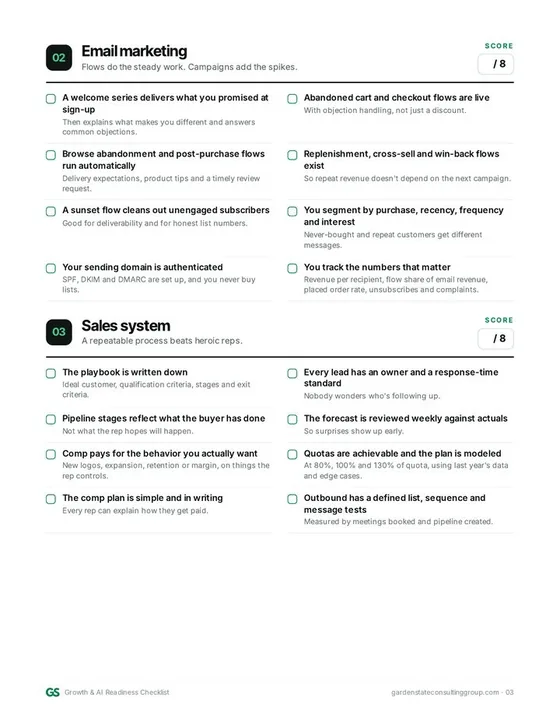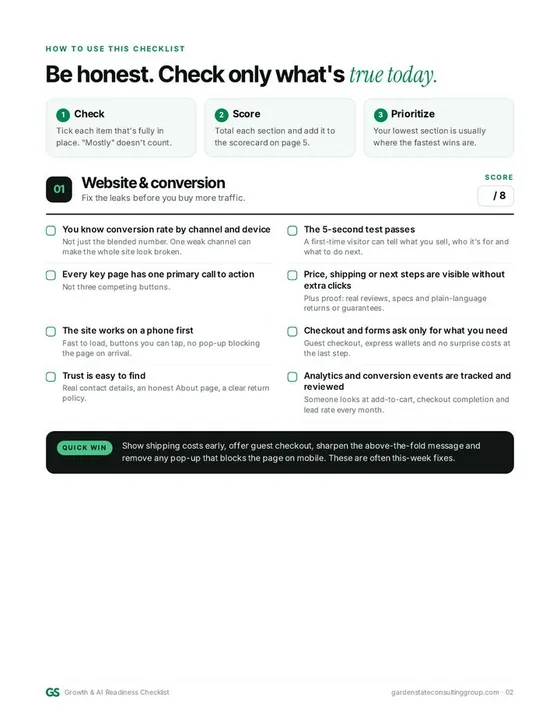
Fix conversion in order: confirm it is really a conversion problem, pass the 5-second offer test, fix product pages before the homepage, use the site on a phone, find where checkout leaks, add trust, and only then buy more traffic.
When an e-commerce site stops converting, most teams reach for one of two levers: a redesign or a bigger ad budget. In my experience, both are usually the wrong first move.
I've owned the P&L for a $150M direct-to-consumer business. At Gogotech, we took monthly revenue from $7M to $11.5M in 60 days, and we cut Google ad spend by 42%. I'm not going to pretend one magic fix did that. What I learned is that the order you fix things in matters more than the number of things you fix.
Here's the order I work in when a store isn't converting, and the fixes I'd make first.
Step 1: Make sure it's actually a conversion problem
A falling conversion rate isn't always a website problem. Sometimes it's a traffic problem wearing a website costume.
Before you touch a single page, break your conversion rate down by:
- Channel. Paid search, paid social, email, organic, direct. One weak campaign can drag the blended number down and make the whole site look broken.
- Device. Mobile and desktop often behave very differently. If desktop is healthy and mobile is weak, you have a mobile problem, not a site problem.
- Landing page. Which pages bring people in, and which ones send them away?
- New vs. returning visitors. Returning visitors usually convert better. If your new-visitor mix jumped, your average will drop even if nothing is wrong.
If one channel or one campaign is the culprit, fix the targeting or the offer in that channel first. Don't redesign a site to solve a media-buying problem.
Step 2: The 5-second offer test
Open your homepage and your top landing page on your phone. Give yourself five seconds. Can a stranger answer these three questions?
- What do you sell?
- Why should I buy it from you instead of someone else?
- What should I do next?
If the answer to any of these is fuzzy, that's your first fix. Clear beats clever every time. Put the product, the main benefit and one obvious call to action above the fold. Cut the slider. Cut the vague tagline. Say the thing.
Step 3: Fix the product page before the homepage
Most buying decisions happen on the product page, so that's where I spend time first. A product page that converts answers every question a buyer has before they have to go looking:
- Photos that show the product clearly, in use, at real scale.
- Price, shipping cost and delivery timing visible without scrolling or clicking.
- Returns and guarantees in plain language, close to the add-to-cart button. (Only promise what you actually offer.)
- Sizing, specs or compatibility for anything where getting it wrong means a return.
- Reviews from real customers, shown honestly.
- One primary button. Not three competing actions.
Go through your top five products by revenue and check each one against this list. That's usually a few days of work, and it touches the pages where the money is.
Step 4: Actually use your site on a phone
Not a desktop browser shrunk down. A real phone, on a normal connection, with your thumb.
Here's what I look for:
- How long does the page take to become usable?
- Can I tap buttons without zooming?
- Do pop-ups block the page before I've seen a single product?
- Does the menu make sense, or is it a copy of the desktop mega-menu?
- Can I get from product page to checkout without fighting the layout?
Speed matters here more than almost anywhere. Heavy apps, oversized images and stacked tracking scripts add up. Remove what you don't use.
Step 5: Find where checkout leaks
Checkout is where intent is highest, so every bit of friction is expensive. The usual suspects:
- Forced account creation. Offer guest checkout.
- Surprise costs. Shipping, taxes or fees that show up at the last step kill trust. Show them early.
- Too many fields. Ask only for what you need to ship the order.
- Limited payment options. Express wallets make mobile checkout much faster.
- Coupon-code field anxiety. A big empty promo box sends people off to search for codes. Make it less prominent.
Look at your funnel step by step: product view, add to cart, start checkout, complete purchase. The biggest drop is where you start.
Step 6: Give people a reason to trust you
New visitors don't know you. Trust signals close that gap:
- Clear contact information and a real About page.
- Honest reviews and ratings.
- Secure checkout and recognizable payment options.
- A return policy that's easy to find and easy to read.
None of this is flashy. All of it matters.
Step 7: Fix the leaks before you buy more traffic
This is the part most teams skip. If your site leaks, more traffic just means more leaking.
When I audit paid acquisition, I look for spend that isn't pulling its weight: broad campaigns with weak intent, keywords that drive clicks but not orders, and budget going to audiences that already would have bought. Cutting that waste and redeploying it to what works is often the fastest margin win available.
How I prioritize the fixes
You won't fix everything at once, so sort the list into three buckets:
- This week: quick wins with obvious impact. Shipping cost visibility, guest checkout, a clearer above-the-fold message, removing a pop-up that blocks mobile.
- Next 30 days: product page upgrades for your top sellers, speed work, checkout simplification.
- Bigger bets: navigation and information architecture, a new theme or a redesign.
Then assign an owner and a date to each item. A list without owners is a wish list.
What to measure
Track these weekly, not just the blended conversion rate:
- Conversion rate by channel and device
- Add-to-cart rate
- Checkout completion rate
- Average order value
- Revenue per session
Revenue per session is my favorite single number, because it captures both conversion and order value.
When a redesign actually makes sense
Sometimes the honest answer is that the site needs to be rebuilt: the platform is fighting you, the structure is a mess, or the brand has outgrown it. When that's the case, do it with conversion as the goal, not looks. I recently redesigned a lead gen site that increased conversion rate by 44%, and the principles are the same for a store: clear message, fewer distractions, an obvious next step.
I wrote more about that in what a website redesign should actually deliver.
The bottom line
Don't guess. Segment the data, fix the pages closest to the money, remove friction from checkout, and stop paying for traffic your site can't convert. Do it in that order and you'll know exactly what moved the number.
If you want a second set of eyes on your store, that's exactly the kind of work I do. I'm an operator, not a typical consultant: quick to diagnose, faster to execute.